

ElyPrismLauncher alternatives: first understand the relationship
Readers weighing ElyPrismLauncher alternatives should first know that PineconeMC is the current name of the launcher formerly called ElyPrismLauncher. Its project site identifies it as a Prism Launcher fork. Searchers may mean the current name, upstream Prism, or another fork with a specific feature.
PineconeMC and Prism Launcher publish separate releases and support. Older ElyPrismLauncher guides may show earlier screens; verify features and downloads at the current project source.
PineconeMC vs Prism Launcher at a glance
This ElyPrismLauncher alternatives comparison summarizes documented scope, not benchmark performance. Results depend on hardware, Java, mods and game version. PineconeMC publishes a feature matrix; Prism documents its workflow. ElyPrismLauncher searchers should verify current release and help pages.
| Question | PineconeMC (formerly ElyPrismLauncher) | Prism Launcher |
|---|---|---|
| Project relationship | A Prism Launcher fork with its own project and releases. The ElyPrismLauncher-named project is now PineconeMC. | The upstream open-source Minecraft launcher. |
| Most visible distinction | Its project site lists integrated Ely.by support alongside Microsoft account support. | Its official site focuses on managing Minecraft instances, accounts, mods and modpacks. |
| Mods and modpacks | A Prism-derived launcher workflow; verify current service support in PineconeMC documentation. | The official site describes Modrinth and CurseForge integration for mods and modpacks. |
| Platforms and packages | Check the current PineconeMC release for supported operating systems and architectures. | Check the current Prism Launcher download page and community packages. |
| Support and updates | Use PineconeMC's own release notes and support channels. | Use Prism Launcher's own release notes and support channels. |
| Best reason to choose | You specifically want a PineconeMC-listed account feature such as Ely.by integration. This distinction answers ElyPrismLauncher account searches. | You want to use the upstream Prism project and its own update path. |
Neither column promises that a particular modpack, account provider or operating system will work forever. Check the exact requirements for your account and the current release before changing your launcher. A new release can add or remove packages, and a server can impose requirements that neither launcher controls.
Account support is the clearest PineconeMC distinction
For ElyPrismLauncher alternatives based on account needs, PineconeMC's official table lists Ely.by and Microsoft support. Ely.by integration is its clearest documented distinction from Prism. ElyPrismLauncher users should follow current official authentication instructions and never enter credentials on unrelated sites.
Prism's overview does not list every provider ElyPrismLauncher users may need, which is not proof of incompatibility. Check its current account documentation; Microsoft setup can differ.
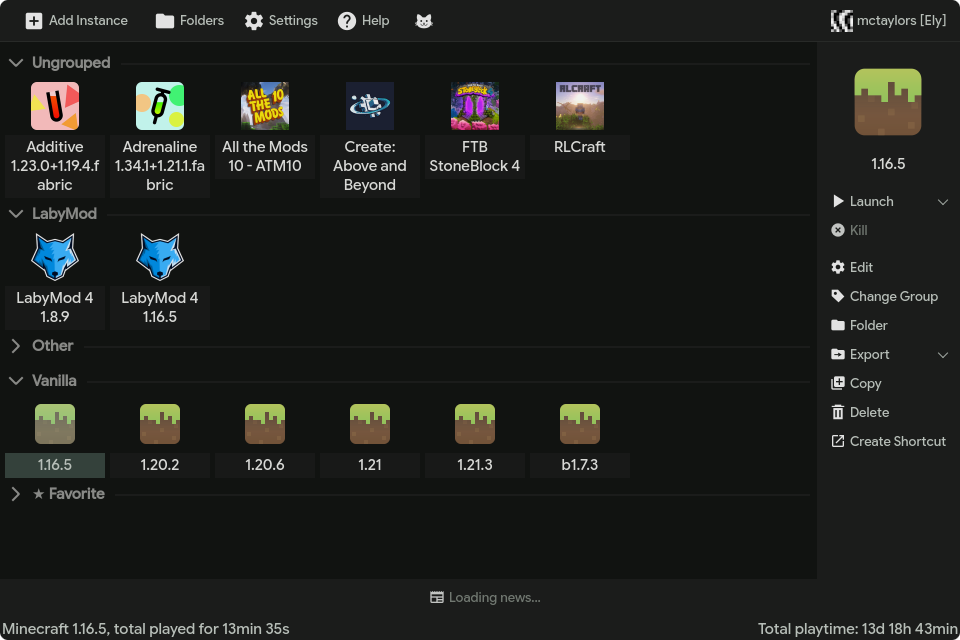
When Prism Launcher may be the better fit
Among ElyPrismLauncher alternatives, Prism Launcher is a straightforward choice when your main preference is the upstream project, its documentation, and its own release and support channels. The official Prism site describes a launcher for creating and managing separate Minecraft instances, installing mods, and handling modpacks through services such as Modrinth and CurseForge. If that is the workflow you need and you do not require a PineconeMC-specific account feature, adding another fork may not solve a real problem.
The upstream choice is also simpler when your existing setup already follows Prism Launcher instructions from a modpack author or support community. Follow the guide that names the launcher you actually installed. Do not post a PineconeMC issue to Prism Launcher support, or assume a Prism Launcher answer applies to a PineconeMC release without checking the fork's own changes. Older ElyPrismLauncher setup notes may not match current screens.

A practical way to choose between the launchers
This ElyPrismLauncher alternatives decision starts with your constraint, not with a long feature checklist. Decide which account you need, which project supplies your modpack instructions, and whether you want to follow an upstream release or a fork's separate release. Then check the official pages for the exact version and platform before installing.
- Name the account requirementIf Ely.by integration is essential, verify it on PineconeMC's official site. For any other provider, read the current account instructions for the exact launcher. ElyPrismLauncher users should verify the current account instructions.
- Check the project named by your guideUse the same launcher named by the modpack, server, or troubleshooting instructions unless you have a specific reason to switch. Older guides may still call PineconeMC ElyPrismLauncher.
- Compare current release sourcesOpen the official release page and confirm the operating system, architecture, package type and update channel. Do not rely on a stale version number in an old guide.
- Test with a separate instanceCreate or import one low-risk instance first. Confirm the game version, loader, account and mod set before moving a larger collection.
- Choose the project you can supportKeep its official documentation and support channel bookmarked so future fixes match the launcher you actually run.
Switch carefully and protect your existing instances
If your ElyPrismLauncher alternatives search leads you to switch projects, close Minecraft and make a separate backup of worlds, instances and any custom data directories you care about. A launcher folder may contain more than downloaded game files. Keep the backup outside both launcher directories, record which profile uses which Minecraft version, and do not delete the original while you are still testing. Keep the ElyPrismLauncher data intact during this test.
If you move an instance, confirm its game version, loader, mods, resource packs, Java selection and account after the import. Start one instance and check the result before moving the rest. If the new launcher does not recognize a folder, stop and read its import instructions instead of repeatedly changing paths or overwriting configuration files. Never copy passwords or session tokens into a web form to make a launcher switch work. If PineconeMC or ElyPrismLauncher does not recognize a folder, stop and read its import instructions.
Practical summary
A concise ElyPrismLauncher alternatives recommendation
For an ElyPrismLauncher alternatives shortlist, use account and project requirements: PineconeMC may fit if you need its documented Ely.by integration; otherwise Prism keeps you on the upstream release and support path. Neither option is universally faster, safer, newer or compatible with every modpack. Verify official sources and test one backed-up instance first.
Common questions
Frequently asked questions about PineconeMC alternatives
Is PineconeMC the same as ElyPrismLauncher?
PineconeMC is the current project name used by the launcher formerly known as ElyPrismLauncher. Check the official project site and release page to confirm you have the intended project.
Is PineconeMC an alternative to Prism Launcher?
For readers comparing ElyPrismLauncher alternatives, PineconeMC is a Prism Launcher fork with its own releases and changes, including documented Ely.by account support. It is a related alternative, not a completely unrelated launcher.
Does PineconeMC support Ely.by accounts?
The PineconeMC official site lists Ely.by accounts and Microsoft account support. Follow the current instructions on that site and complete authentication in the launcher, not on an unrelated page. Former ElyPrismLauncher users can check the PineconeMC official site for account support.
Can I move Prism Launcher instances into PineconeMC?
Do not assume a migration is supported just because PineconeMC is a fork. Back up the instance, check the current import instructions, and test one instance before moving a collection.
Which launcher should I use for a modpack?
Use the launcher named by the modpack's current instructions when possible. If you switch, verify the Minecraft version, loader, mod files and account rules before testing the instance.
Where can I download either launcher safely?
Open the project website or release page for the exact launcher you want. This guide does not host installers; avoid repacked downloads and confirm the platform and architecture on the official page.